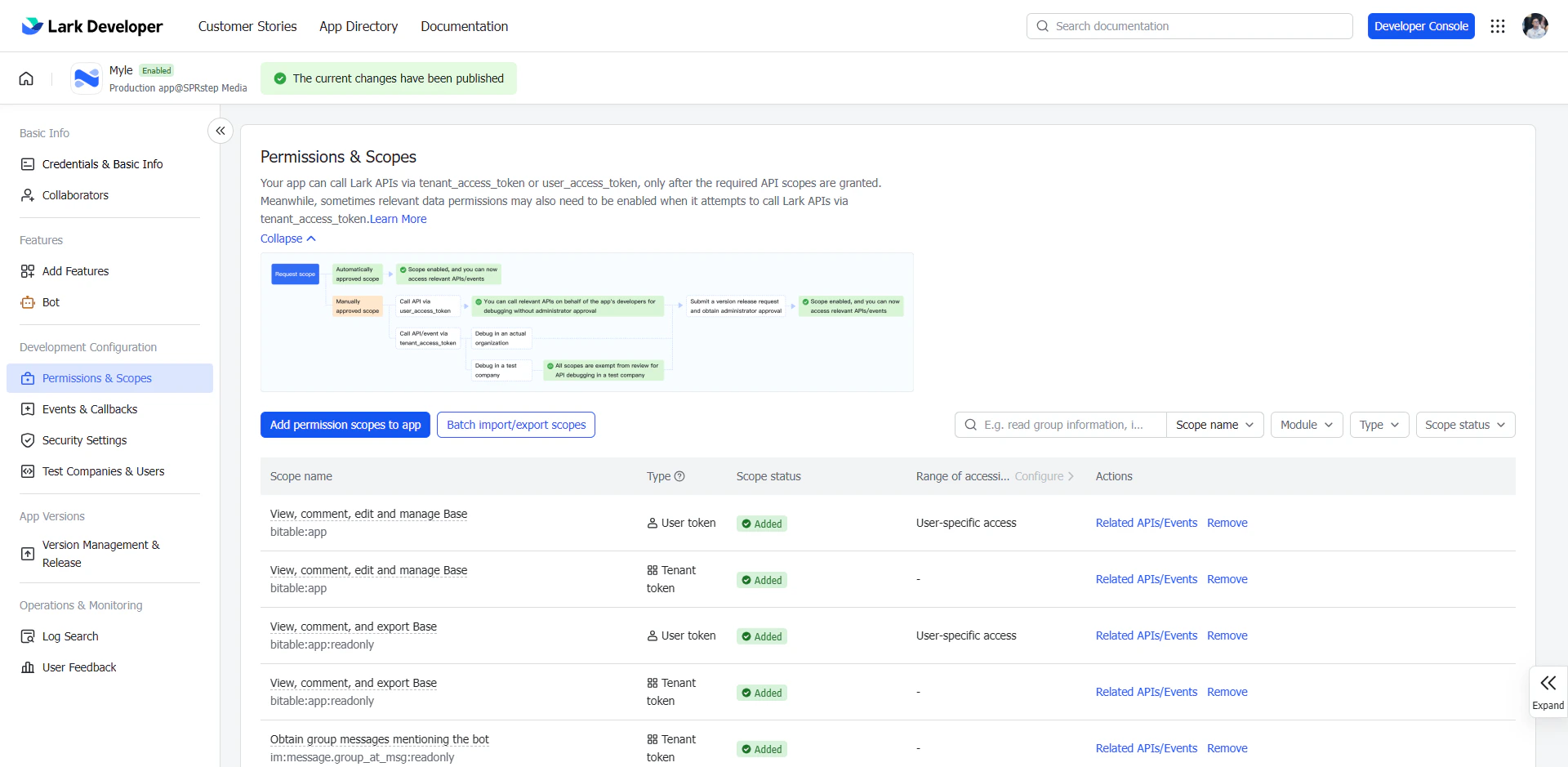
Lark Skill cần quyền truy cập vào các tính năng của LarkSuite. Bạn phải thêm 35 OAuth scopes vào ứng dụng vừa tạo.
Bạn cần thêm scopes cho cả hai loại token: Tenant token scopes và User token scopes. Nếu chỉ thêm cho một loại, một số tính năng sẽ không hoạt động.
Cách thêm scopes
Mở trang Permission & Scope
Trong Developer Console, vào ứng dụng của bạn → tab “Permission & Scope” (hoặc “API Scopes”) Thêm scopes cho Tenant token
Chọn tab “Tenant token scopes” → dùng ô tìm kiếm, gõ tên scope và bấm “Add”. Lặp lại cho từng scope trong danh sách bên dưới.
Thêm scopes cho User token
Chuyển sang tab “User token scopes” → thêm cùng danh sách scopes như trên (trừ các scope tenant-only ghi chú bên dưới).
Lưu và publish lại
Sau khi thêm xong tất cả scopes cho cả hai tab, bấm “Save”. Nếu app đã publish, tạo version mới và publish lại để scopes có hiệu lực.
Danh sách scopes theo nhóm
Lịch (Calendar)
Công việc (Task)
Tin nhắn (Messenger)
Liên hệ (Contacts)
Tài liệu & Drive
Bảng tính & Base
Xác thực
| Scope | Token | Mô tả |
|---|
calendar:calendar | Cả hai | Đọc và ghi lịch |
| Scope | Token | Mô tả |
|---|
task:task:read | Cả hai | Đọc task |
task:task:write | Cả hai | Tạo, sửa, xoá task |
task:tasklist:read | Cả hai | Đọc danh sách task |
task:tasklist:write | Cả hai | Quản lý danh sách task |
task:section:read | Cả hai | Đọc section |
task:section:write | Cả hai | Quản lý section |
task:comment:read | Cả hai | Đọc comment task |
task:comment:write | Cả hai | Viết comment task |
task:custom_field:read | Cả hai | Đọc custom field |
task:custom_field:write | Cả hai | Quản lý custom field |
| Scope | Token | Mô tả |
|---|
im:message | Cả hai | Đọc và gửi tin nhắn |
im:message:send_as_bot | Tenant only | Gửi tin nhắn dưới dạng bot |
im:message:send_multi_depts | Tenant only | Gửi hàng loạt theo phòng ban |
im:message:send_multi_users | Tenant only | Gửi hàng loạt theo người dùng |
im:chat | Cả hai | Quản lý nhóm chat |
im:chat:readonly | Cả hai | Chỉ đọc nhóm chat |
im:resource | Tenant only | Tải lên ảnh/file cho tin nhắn |
| Scope | Token | Mô tả |
|---|
contact:contact | Cả hai | Quản lý liên hệ |
contact:contact.base:readonly | Cả hai | Đọc thông tin cơ bản |
contact:user.base:readonly | Cả hai | Đọc thông tin người dùng |
contact:user.department:readonly | Cả hai | Đọc phòng ban |
contact:user.email:readonly | Cả hai | Đọc email |
contact:user.employee_id:readonly | Cả hai | Đọc mã nhân viên |
contact:user.id:readonly | Cả hai | Đọc user ID |
contact:user.phone:readonly | Cả hai | Đọc số điện thoại |
| Scope | Token | Mô tả |
|---|
docx:document | Cả hai | Tạo và chỉnh sửa Lark Docs |
docx:document.block:convert | Cả hai | Chuyển đổi block trong Docs |
drive:drive | Cả hai | Quản lý Lark Drive |
drive:drive:readonly | Cả hai | Chỉ đọc Lark Drive |
wiki:wiki | Cả hai | Tạo và chỉnh sửa Wiki |
wiki:wiki:readonly | User only | Chỉ đọc Wiki (user context) |
board:whiteboard:node:read | Cả hai | Đọc Whiteboard |
| Scope | Token | Mô tả |
|---|
sheets:spreadsheet | Cả hai | Đọc và ghi Lark Sheets |
bitable:app | Cả hai | Quản lý Lark Base |
| Scope | Token | Mô tả |
|---|
offline_access | User only | Refresh token cho phiên dài hạn |
Danh sách đầy đủ (copy-paste)
Dán trực tiếp vào ô tìm kiếm scope trong Developer Console. Định dạng phân cách bằng dấu cách (space-separated).
Tenant token scopes (34)
User token scopes (30)
bitable:app board:whiteboard:node:read calendar:calendar contact:contact contact:contact.base:readonly contact:user.base:readonly contact:user.department:readonly contact:user.email:readonly contact:user.employee_id:readonly contact:user.id:readonly contact:user.phone:readonly docx:document docx:document.block:convert drive:drive drive:drive:readonly im:chat im:chat:readonly im:message im:message:send_as_bot im:message:send_multi_depts im:message:send_multi_users im:resource sheets:spreadsheet task:comment:read task:comment:write task:custom_field:read task:custom_field:write task:section:read task:section:write task:task:read task:task:write task:tasklist:read task:tasklist:write wiki:wiki
bitable:app board:whiteboard:node:read calendar:calendar contact:contact contact:contact.base:readonly contact:user.base:readonly contact:user.department:readonly contact:user.email:readonly contact:user.employee_id:readonly contact:user.id:readonly contact:user.phone:readonly docx:document docx:document.block:convert drive:drive drive:drive:readonly im:chat im:chat:readonly im:message offline_access sheets:spreadsheet task:comment:read task:comment:write task:custom_field:read task:custom_field:write task:section:read task:section:write task:task:read task:task:write task:tasklist:read task:tasklist:write wiki:wiki wiki:wiki:readonly
Một số scope có thể cần Admin của tổ chức phê duyệt trước khi có hiệu lực. Nếu gặp lỗi permission denied sau khi cài xong, hãy kiểm tra trạng thái phê duyệt trong Developer Console.
search_users (tìm kiếm người dùng) yêu cầu quyền cấp app-level trong Developer Console - không phải OAuth scope. Bật riêng tại tab “App Capabilities”.